 Vouchline Incident Clock by RETEK
Know your next reporting deadline the moment an incident starts.
Vouchline Incident Clock turns a Jira Service Management ticket into a guided NIS2 and KSC reporting workflow: the 24-hour, 72-hour and one-month deadlines counted from detection, the S46 notification ready to paste, and a tamper-evident record of every decision.
Watch the 2-minute demo on YouTube →
Runs on Atlassian · No servers of our own · Polish and English · Built for KSC and NIS2
KSC / NIS2
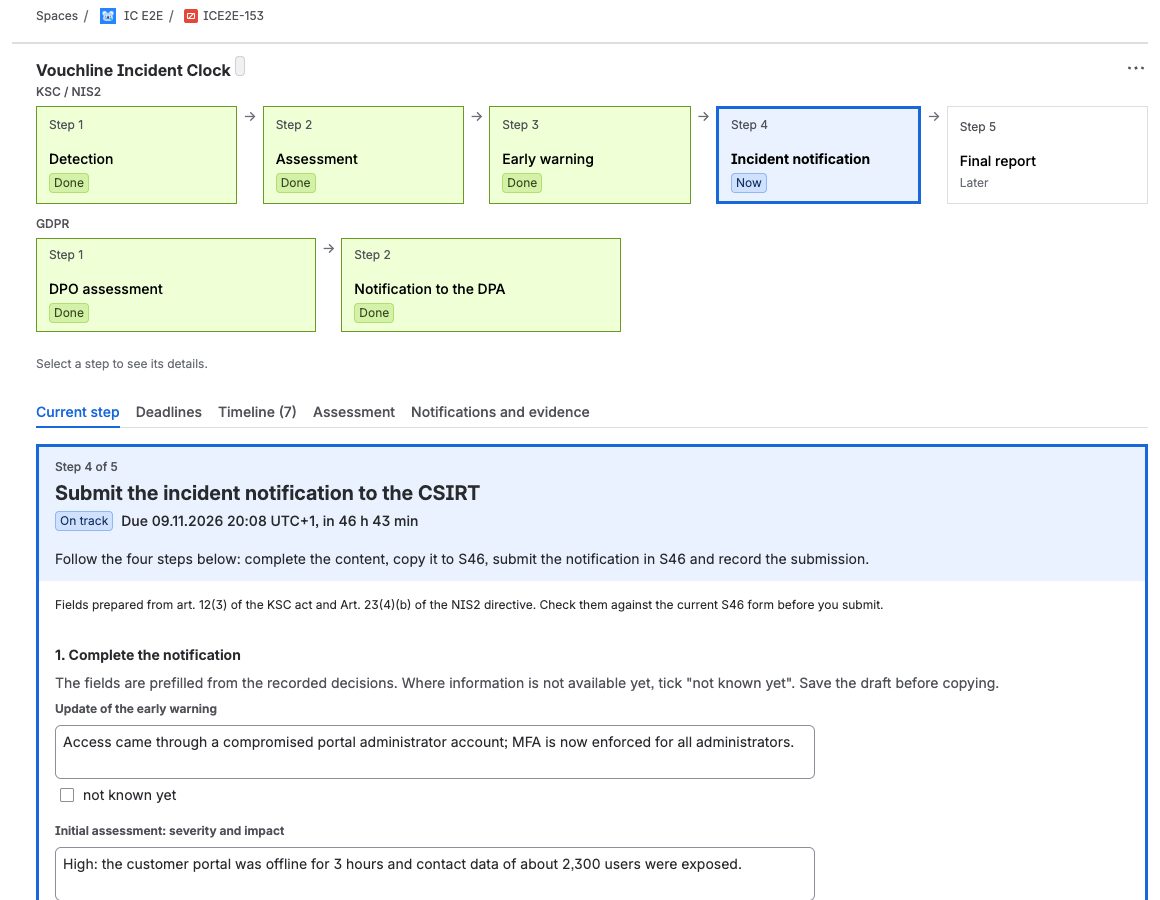
1 Detection ✓ → 2 Assessment ✓ → 3 Early warning → 4 Notification → 5 Final report

Current step · Deadlines · Timeline (6) · Assessment · Evidence

STEP 3 OF 5
Submit the early warning to the CSIRT
Due 06.11.2026 12:55 (UTC+1), in 21 h 30 min

  1. Complete the prefilled content
  2. Copy it to the S46 form
  3. Submit it in S46
  4. Record the S46 number   [ Confirm submission ]

Warnings 12, 4 and 1 h before each deadline
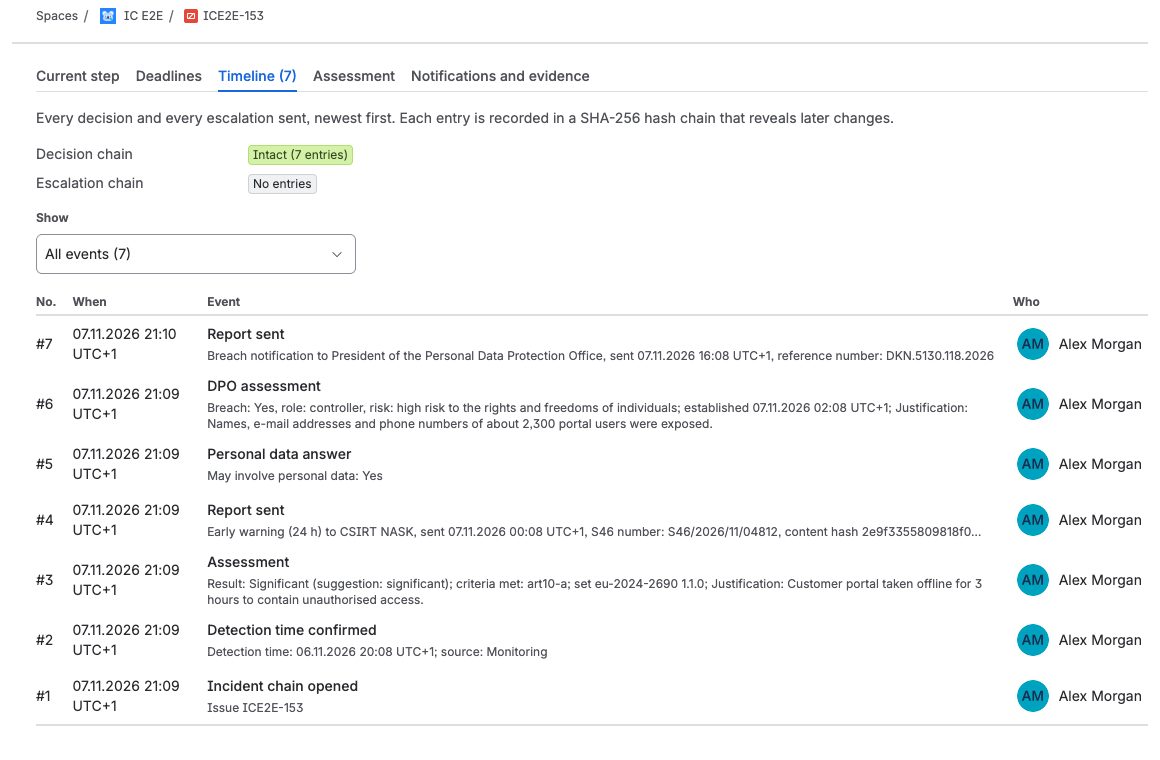
Every decision: who, when and why · hash-chained
The first 24 hours shape how the regulator sees you
In practice the clock starts at night, the person who knows the rules is away, and the evidence is scattered across chats and e-mails.
What your team gets
One step at a time
The panel shows the step to do now, with its deadline, its form and one button. The road of the incident and the tabs for deadlines, timeline, decisions and evidence are always right above it.
Every deadline, visible from detection
Countdowns for the early warning, notification, intermediate and final reports, in Polish time, with daylight saving handled.
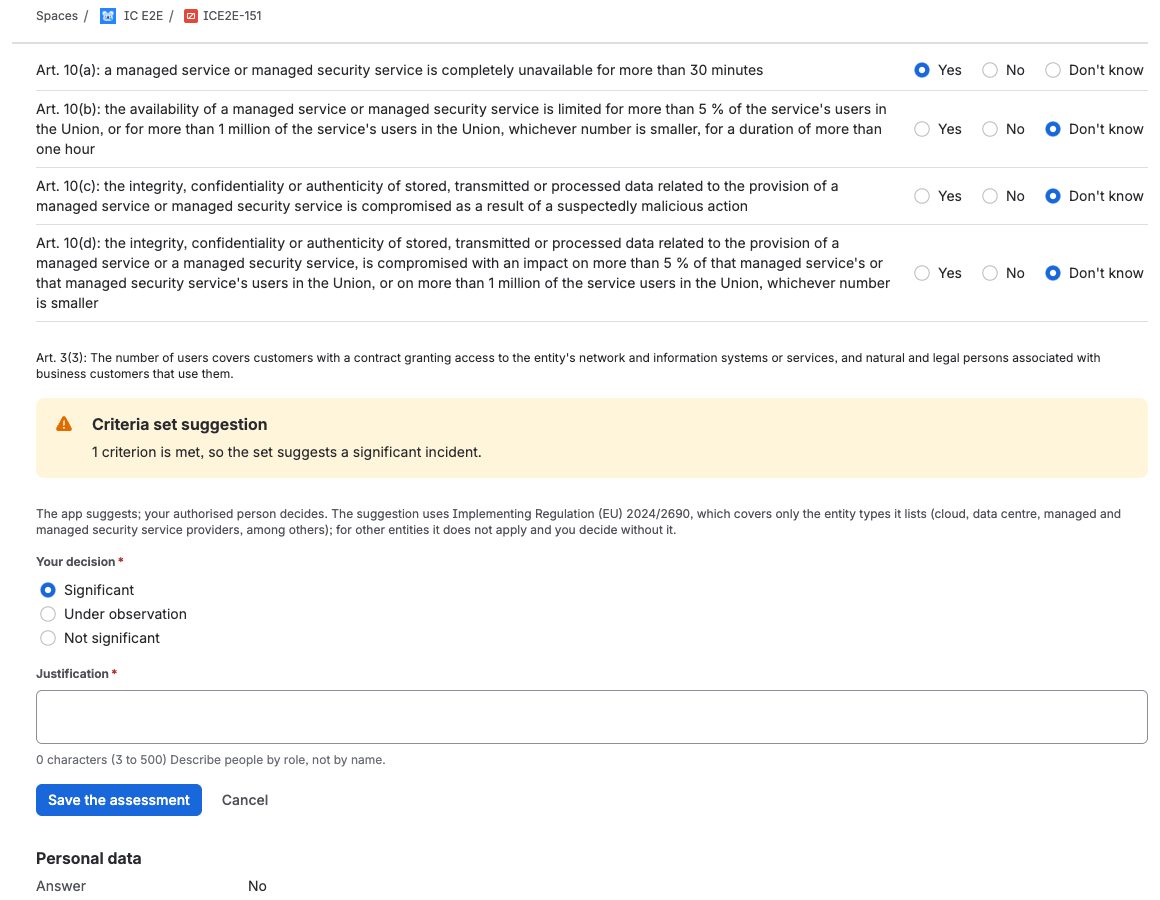
A significance decision in minutes
Each question shows the wording of Implementing Regulation (EU) 2024/2690. The app suggests; your authorised person decides, and any deviation is recorded with a reason.
Escalations that keep going
Warnings 12, 4 and 1 hour before each deadline, repeated every 30 minutes until someone takes over, with a deputy if nobody does.
The S46 notification, ready to paste
Fields are filled from the incident. Copy them one by one or all at once, record the S46 number, and the text you sent is kept as it was.
GDPR in the same place
A task for your DPO with the 72-hour clock, the controller or processor role, and a record of the notification to the data protection authority.
Evidence an auditor can check without Jira
A PDF and JSON package with the timeline, the stage table and the texts you sent, linked in a SHA-256 hash chain that reveals later changes.
Emergency card
A one-page PDF with the deadlines and steps, for when Jira is not at hand.
Drills in accelerated time
One minute counts as one hour, so your team can rehearse a full report in an afternoon and keep the protocol.
See it in Jira
Screens from a demo incident at a fictional managed service provider. The same incidents in motion: the 2-minute demo on YouTube.
How it works
Confirm detection
The clock starts.
Answer the criteria
See what to report and by when.
Paste into S46 and record it
The evidence builds itself.
Your data stays in your Atlassian site
Runs on Atlassian: the app has no servers of its own and sends nothing to us. Its data stays in your site's Forge storage and follows your data residency. Escalation e-mails are sent by Jira and contain only the ticket key, the stage and the deadline.
Built for
- Key and important entities under KSC and NIS2 that run Jira Service Management
- Managed service and managed security service providers
- Security and compliance teams preparing for audits and drills
Questions people ask first
Does the app submit notifications to S46?
No. S46 needs your own authenticated account. The app prepares the text and records what you sent and when.
Is this legal advice?
No. The app supports your process; your team decides and files.
Which entities get significance suggestions?
The criteria set follows Implementing Regulation (EU) 2024/2690: its general criteria (Article 3), recurring incidents (Article 4), and the specific criteria of Articles 5 to 14 for DNS service providers, TLD name registries, cloud computing, data centre and content delivery network providers, managed service and managed security service providers, online marketplaces, online search engines, social networking platforms and trust service providers. Your admin ticks which of these services you provide, and the app suggests from the general criteria plus those. The regulation covers only the entity types it lists; if yours is not one of them, the suggestion does not apply and your authorised person decides without it — the app says so next to the assessment.
Can we practise before a real incident?
Yes. Start an exercise in accelerated time (one minute counts as one hour) in a new ticket and run the whole report in about 30 minutes. It ends with an exercise protocol and is never counted with real incidents. See Getting started.
Does it work in English?
Yes. The app follows each user's Jira language, Polish or English.
What if Jira is unavailable during an incident?
Use the emergency card, which lists the deadlines and steps on one page.
Where is my data?
In your Atlassian site's Forge storage. See the privacy policy.
Know the next deadline before anyone has to ask.
Questions before you try it? Write to support@retek.app.
More from RETEK for Jira
Audits under NIS2 and ISO/IEC 27001 also look at who has access to your systems and which assets you hold.

